
Hey everyone, Jewelle here! As far as scrapping goes I have always had one foot stuck in the digi world and one in the paper world. I enjoy the wonderful dimension you can get from paper and the exactness you can get from digi. Those reasons are why I enjoy hybrid scrapping so much! I know that it can be intimidating to step from your comfort zone and dive into something new, but I know you can do it! Today I’m sharing with you some hybrid card basics that will hopefully give a nudge to those of you who have been thinking about giving hybrid a try. I know some of you are asking “Why hybrid card basics and not just hybrid basics?” well, I think that card making is the easiest hybrid project to start with when diving into hybrid. Lets go over some basic supplies you need to make a card:
- Imagery software (Photoshop, PSE, GIMP, SBC, CraftArtist, etc)
- A pack of Kate’s doodles
- White cardstock or presentation paper
- Printer or access to a copy spot that prints color
- Scissors or paper trimmer
- Optional: Pre-folded cards
- Optional: Adhesive(Gluestick, Dot Runner, etc)

Before we get to making that card lets talk about why you want/need the above supplies.
- Imagery software — From experience I can tell you that it is possible to create a card without imagery software. I can also tell you that it is very difficult to do and takes a lot more time! Having a software suitable for manipulating images makes the whole process easier. I use PSE which is a great beginner software to learn on.
- Kate’s doodles — I think that one is obvious!
- White cardstock or presentation paper — Both of these are good options to print on. Many hybrid scrappers will tell you they prefer presentation paper because when printing on cardstock your colors can be muted. I find this to be mildly true, but I don’t think your project is ruined or looks awful if you do use cardstock. I suggest just using what is readily available for your first project.
- Printer or access to a copy spot that prints color — If you are happy with your printer and the way it prints color then use it! If you don’t have a printer or your printer doesn’t print well, find a local copy spot. For my cards I usually print at home. However, I do send out to my local copy spot if I am making duplicates of a card, making a large hybrid project, or if I’m having a fight with my printer.
- Scissors or paper trimmer — Either of these instruments will work to create a card. Precision scissors are great if you want to cut out small details. Regular old scissors will work too! Paper trimmers work well for cutting out different sized papers in a quick and efficient way.
- Optional: Pre-folded cards — I buy these from my local scrap book store, or I make them out of cardstock. I always mount my card fronts on these type of cards because it saves me paper in the long run.
- Optional: Adhesive — If you are going to use pre-folded cards you will need an adhesive to stick the pieces together.
I know that was bit of information to throw at you, but just take a few minutes to review it and you’ll be ready to make a card. Do you have all your supplies ready? Lets discuss how get to a finished card. It only takes three steps!
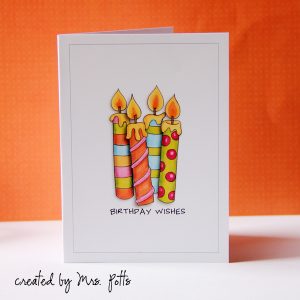
1. Using Kate’s doodle pack create a card using your imagery software. For those of you who are digital scrappers just think of it as a photoless layout! I’ve used Bring on the Cake to create my sample below:

2. Time to print that card!

3. Cut and glue cover to front of your prefolded card. You are done!

Now that wasn’t too hard was it? Go ahead and post your cards that you make in Kate’s gallery over at The Lilypad. I would love to see them! Next month I’ll be coming back and show you a few simple techniques that will take this same card from basic to advance! I hope to see you then!

 Eggheads and Colour In Eggheads
Great tutorial! Your card came out beautifully too. I must get back into making cards.. Kate’s doodles are just perfect for them! It’s so true about the store bought ones, people expect handmade once the bar has been set. 🙂 Besides, they can run you $5-6! I could spend that on digi supplies and make a whole lot more of them. Thanks for the tips!
Very pretty card!
Looks terrific Jewelle! I love making cards… Once you start though you create a monster! Especially the recipients as they no longer want store bought! I love the personalization a homemade card allows, and mixing with Kate’s doodles… Perfection!
Looks fabulous, Jewelle!! 🙂