
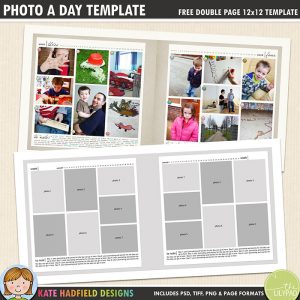

You might remember that a little while ago I waffled on and on trying to decide how to tackle Project 365 this year. Well, I finally made a decision – and it’s only February! I’m going to do it digitally. I know, a HUGE surprise for this digi-loving girl! I finally made the decision based on the following:
- I know I won’t get my photos printed often enough. Case in point: I have printed a grand total of, wait for it…. wait for it…. 0 of the photos I need for the December Daily project I have been working on.
- This is going to sound a bit odd, but I don’t like page protectors. I don’t like the plastic, shiny, slipperiness of them. And the way things move around inside them, and fall out.
- Seeing other people’s Project Life albums come together and thinking about our family life, I am wondering how many pieces of real “stuff” (photos, tickets, receipts, drawings etc) I would actually keep, as opposed to scan or photograph. And I am thinking that the answer is probably, “Not very many at ALL.”
So all in all, I think a sleek non-shiny-plastic digital photobook is the way for me to go! Looking back through the photos I took for last year’s Project 365 I am really drawn to the simple little everyday bits and pieces I captured that I wouldn’t have even thought to snap if it hadn’t been for this project, so that’s what I am going to focus on again this year, with bigger spreads for special events, and maybe even some “proper” layouts thrown into the mix!
Free digital scrapbook template
I made a template from the format I used for last year’s photos, in the layout example below you can see how I swapped the columns of photos round to suit the images I had. I tend to take a lot of upright pictures and this format worked well for me last year! Across the top there’s a text layer I used to highlight which dates my pictures covered (I just changed the font colour for the date range for the page). You can download this free P365 template here:

Download Project 365 Template
There are actually two separate layered files in the zip rather than one big 12×24 template. I found it easier to work on one page as I tend to work on one week at a time, and my computer likes the smaller file size of a single page rather than a big 12×24 spread! If you use the templates, I would love to see what you make so please feel free to link me up! 🙂
Happy Project 365-ing!

 Thais’ Monsterific birthday
Thank you. I love the templates on your site and also getting to see how people use them in creative ways. Thanks so much for the inspiration.
Thank you so much for your lovely comment! I always love seeing how the team will use the templates, they always come up with some amazing, fun ideas! I’m so glad you enjoy them too, thanks for taking the time to leave a comment!
just found this awesome template and I feel it appeals to my desire to get my pages done for my family scrapbook – now I’m off to try it right now.
Thank you for this template!
Thank you!
Thank you so much Kate for this awesome template. I also prefer to do 365 in digital, and I love it.
Thanks for the template. I’m just starting to digital scrapbook, I’ve always done it the traditional way but am really drawn to the clean lines of these pages so I think I will use the template for a regular page in my album. Thanks again!
Thank you for the great template!
Thank you so much for this! I just started my P365 this year and have been so excited that I have kept up with it. I also just bought the Craft Artist Digital Scrapbooking Program to do this project… I am a traditional scrapbooker, but I know I too won’t print 365 pictures to do this project! lol. I also wanted to be able to use my personal handwriting font on my project to add that personal touch! Thank you so much for sharing this template!
Thanks Kate for the template 🙂
This template is FABULOUS! Thank you so much for sharing. AWESOME!
Thanks for this – just what Im after!
Actually found your blog just now while looking for ideas to do a 365 album.
Off to make a cuppa and will pop back for a read while the kiddies are sleeping x.
You’re welcome! Have fun making your 365 album! 🙂
Just started playing with digi. Thank you!
THANKS KATE!
Thanks for sharing.
Great template! Thanks for sharing it!
Thank you!
Thank you again so much for sharing this! I just added my January photos, and I’m loving it! Question: What did you use for the little numbers on each photo?
Hi Jenny! This isn’t exactly the same product (I think the designer revamped and made more colour varieties for each day!) but you could try this for the day numbers: http://shop.scrapbookgraphics.com/Everyday-365-Date-Flair.html Hope that helps!! 🙂
Thank you! These look great–love the simplicity.
Thank you! I really love the simplicity. I’m planning to do monthly layouts with special ones for big events (or really great photos), but I haven’t figured out how I want to design the monthly pages so that they have some cohesiveness. Anyway, I’m going to give your templates a try. They may be just what I’ve been looking for! 🙂
thanks for sharing…trying to start my 3rd year of P365 (yr 1, still in July, yr 2 – only finished monthly summaries, now…mostly up to date).
Hey! Thank you so much 🙂
Thank you…I love the clean look!
Love this, Kate! I haven’t decided if I want to try to scrap my P365, but if I do, this is most likely the route I’d go. Wonderful design! Thanks so much!
Thank you!
Thank you so much for sharing – I typically only scrap digitally so this is so perfect for me, too! 😀
Thank you! That’s awesome!
thank you kate! LOVE these!
VERY VERY cool template! Thanks so much for sharing it with us!
jen
Thank you so much for this post. I want to let you know that I posted a link to your blog in CBH Digital Scrapbooking Freebies, under the Page 3 post on Feb. 09, 2011. Thanks again.
Thanks so much for sharing! I’m not doing P365, but this will be perfect for an album I’m working on that is 3 years worth of iphone photos! Thanks again!
Thank you very much for this template Kate. I’ve struggled with P365 for a couple of years. Taking the photographs is easy, getting the pages scrapped is not..maybe switching to a cleaner type layout is the key for me.
Merci beaucoup !!
Thank you very much!
thank you for the great P365 template!
I LOVE this template! Crisp, simple, perfect. Thank you so much for sharing it with everyone!!
Thanks for the template, Kate!
Thanks, Kate! a great looking, versatile template 🙂
Thanks, Kate! I decided to tackle the 365 project, too, but will probably do a monthly layout instead of weekly..but we’ll see as I get through this first batch!